Print operations for retail networks that have outgrown the spreadsheet.
Athena gives a multi-store retailer a single workspace for managing in-store print:
a current asset library, structured ordering, real budget control, vendor fulfilment,
and proof of delivery. With a clean audit trail at every step.
13 languages, regional hosting Microsoft Entra ID ready
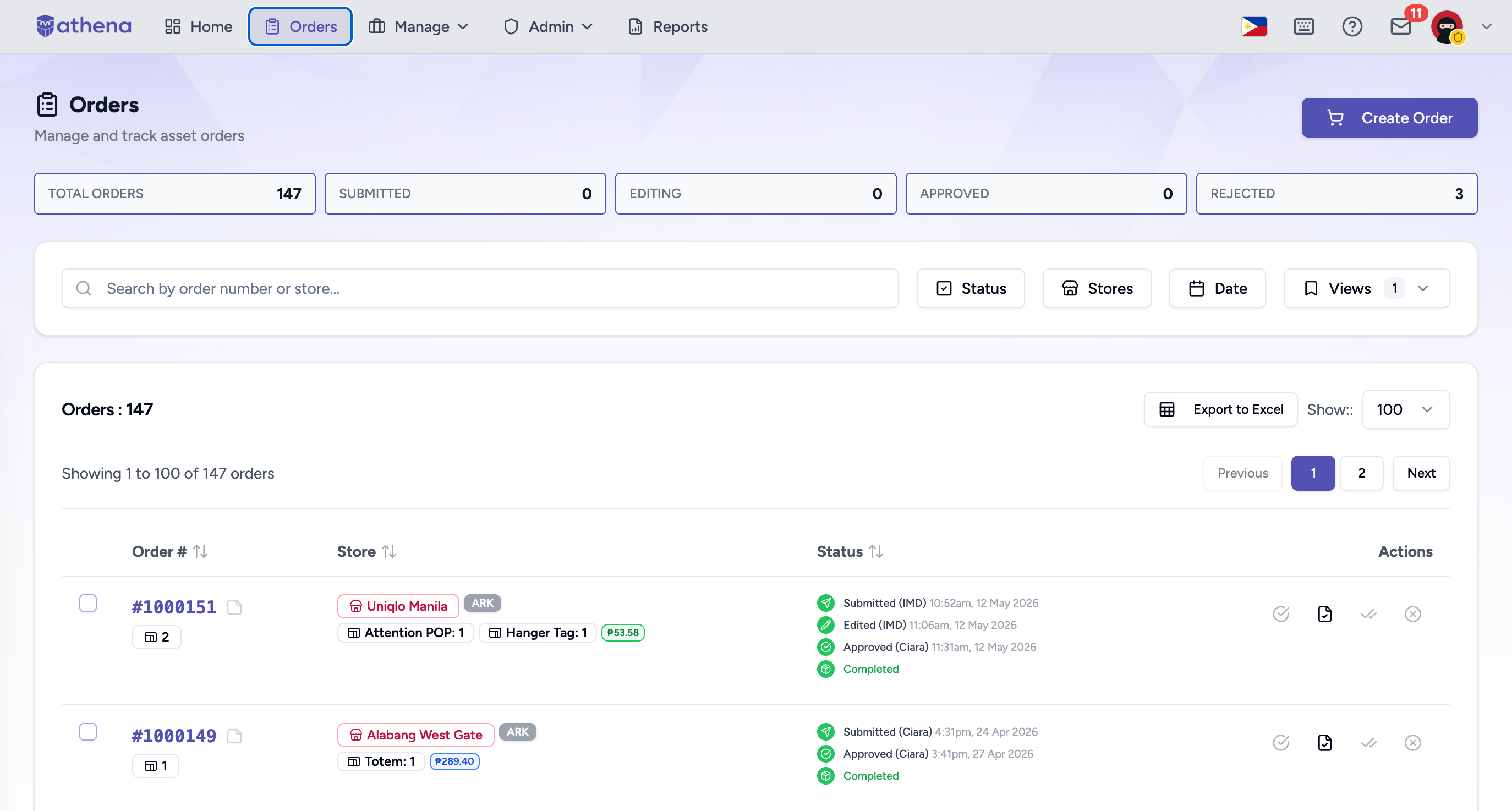
Place the screenshot here
Save your screenshot as athena-orders-screenshot.png
in the same folder as this HTML file and reload.
The case for a system
Most retailers manage print informally for as long as they can. Then one day they can't.
At five stores, the informal version works. A regional marketing manager keeps the
master artwork on a shared drive. Stores email HQ when they need new posters or
wobblers. HQ keeps the budget in a spreadsheet and forwards orders to the print
vendor. Everyone knows everyone.
At twenty stores it frays. At fifty the wheels are off, and nobody can say exactly
when it happened. Stores reorder material they didn't realise they already had.
Outdated seasonal artwork keeps appearing in window displays. Budgets get blown
with no early warning. And when finance asks for a clean breakdown of spend by
store and category, somebody spends two days in Excel building it from scratch.
“Most of the people involved spend most of their time on coordination, not on the work.”
That's the symptom that's easy to talk about. The deeper one is rarely named:
most of the people involved spend most of their time on coordination, not on
the work. HQ staff manually verify quantities and dimensions on every order. Store
staff chase approvals and hunt for the right version of an asset. Vendors take
phone calls and forward WhatsApp messages. Everyone is busy. Almost nothing they're
doing is creating value.
Athena replaces the informal process with a structured one. The asset library is
the only place stores can order from, so what's there is current. Orders run through
a real form with real budget checks, so duplicates and overages are caught before
approval, not after print. Approvals are one click with full context. Vendors mark
shipment and upload proof of delivery from a link. Everything is logged. Reports
finance actually needs are one click away.
That's the whole product. The rest of this page is how each piece works.
What actually changes
Stage by stage, here is what's different.
The structure of the work doesn't change — it's still assets, orders, approvals,
delivery. What changes is where each piece lives and how much human time it takes.
Stage
Without Athena
With Athena
Asset library
Shared drives, email attachments, USB transfers. Stores unsure which version is current. Expired assets still in circulation.
A single source of truth. Assets tagged with season, dimensions, expiry. Stores see only current, approved, size-relevant assets.
Ordering
Excel sheets, email to HQ, WhatsApp messages, or internal systems designed for furniture, not marketing print.
Structured web form. Budget checked in real time. Duplicate orders flagged. Submitted in minutes with full item detail.
Approval
Email chains. HQ manually cross-checks quantities, costs, and duplicates. Approvals lost in inboxes. No audit trail.
One-click approval with full order context. Budget limits checked automatically. Every decision timestamped and logged.
Fulfilment
HQ calls or messages the vendor. Vendor confirms via WhatsApp. Tracking number shared manually. No delivery visibility.
Vendor receives a structured delivery note, marks shipping with a tracking number. Status visible to all parties in real time.
Proof of delivery
Photo sent via WhatsApp or email. Stored nowhere reliable. Impossible to retrieve later for disputes or audits.
Vendor uploads photos via a secure link or QR code. Stored against the delivery record. Exportable for audits.
Reporting
Manual data compilation at month-end. Hours spent building Excel summaries across stores, categories, and vendors.
Live reports available anytime. Filter by store, category, vendor, date. Export to Excel in one click.
Asset updates
New seasonal assets emailed to stores. Old versions not reliably retired. Stores may keep printing outdated materials.
Admin uploads new assets; old ones can auto-discontinue on expiry. Stores see the updated library immediately. No communication overhead.
How it works
Six steps, one trail, one system.
Every order moves through the same path. Each step is logged with the user,
timestamp, and IP. Reports come from that trail directly — there is no second
place where data lives.
01
Asset library
Admin uploads, tags, targets by store and season. Assets carry expiry dates.
02
Order submission
Store picks assets and quantities. Budget is checked against the cart in real time.
03
Approval
HQ or Admin reviews with full context — approve, or reject with a reason.
04
Fulfilment
Vendor receives a delivery note and marks shipped with a tracking number.
05
Proof of delivery
Vendor uploads photos via a secure link or QR code. Stored against the order.
Athena is configuration-driven. There is no infrastructure to provision and no
custom code to write. A country deployment usually runs to this rhythm.
1
Configuration
Language, currency, store types, categories, modules, branding — all through the admin UI.
2
Data & users
Import stores, budgets and initial users from Excel. Seed the asset library. Set up vendors.
3
Pilot
Role-based training. A pilot group runs live orders end-to-end. Feedback incorporated.
4
Rollout
All stores activated. First full cycle runs. In-app help available in local language.
Who works in the system
Six roles. Six views. One trail.
Admin
Full system control. Manages users, settings, audit log, configuration.
HQ
Organisation-wide oversight. Approves orders, manages stores and vendors, broadcasts.
Manager
Assigned store oversight. Reviews and rejects orders, and views analytics for their region.
Store
Creates and submits orders. Views own budget utilisation and order status.
Vendor
Receives delivery notes, ships materials, uploads proof of delivery with photos.
Designer
Manages the asset library across every store — uploads, edits, categorises, bulk operations. No access to orders or settings.
What it does
Four things, done properly. Plus the small things that matter.
Most platforms in this space pile features. Athena is built around four jobs that
have to be done well — and a deliberate set of secondary capabilities that exist
because someone, on a real deployment, needed them.
01 / Pillar
A current, governed asset library.
Assets carry metadata that the system actually uses: dimensions, expiry,
season, store-size targeting. Stores see only what's relevant
to them and only what's still in date. Expired assets fall out of the orderable library.
Batch uploadAuto-extracted metadataExpiry windowsStore-size targetingPrintable PDF catalogue
Asset library · Spring 2662 active
A1 · KLC
A2 · STD
WB · ALL
ST · STD
A1 · OUT
A0 · FLG
WB · STD
ST · SML
02 / Pillar
Budgets that are real, not aspirational.
Per-store monthly allocations, with optional additional pools — for example, CAPEX and
OPEX, tracked independently. Spend is checked at the moment an order is built,
not after print. Going over a threshold warns; optionally, going over the limit blocks.
Per-store monthlyExtended pools (CAPEX / OPEX)Warn at 80%Block at 100%Excel import
Budget · May 2026RM
KLCC Flagship1,820 / 3,500
Pavilion KL2,640 / 3,000
Mid Valley1,150 / 2,500
Sunway Pyramid2,500 / 2,500
IOI City Mall980 / 2,500
Sunway Velocity1,920 / 2,500
03 / Pillar
Fulfilment that ends with photographic proof.
Vendors work through a dedicated portal — and you can run as many as you need.
Each vendor covers its own set of stores and categories, so an order only reaches
the vendors that can fulfil it, who accept it from their pending queue. Each
delivery has a structured note, a tracking
number, an SLA clock, and a proof-of-delivery upload. Photos sit against the order
forever, not in a WhatsApp thread that scrolls away.
Multiple vendorsPer-store & category routingVendor portalTracking URLsQR-code POD uploadDN stamp on PDFsSLA breach alerts
Order #ATH-8411 · Pavilion KL2 of 4
Delivery note issued
15 May 09:12
Marked shipped · TRK-882140
15 May 14:48
Awaiting POD upload
due 17 May
Store confirmation
—
04 / Pillar
And when something's wrong, a record — not an argument.
Delivery isn't always the end. A poster arrives miscut, a quantity is short, a
colour is off. Stores and HQ raise the issue against the exact fulfilment and
attach photographs; the vendor responds in the same thread. Every message is
timestamped, and the whole exchange reads as resolved or still open at a glance.
Photo evidenceThreaded responsesResolved / open statusFilter by issue
Order #ATH-8411 · issue● Open
Store · 2 of 40 posters arrived creased — 3 photos
16 May 10:04
Vendor · reprint dispatched for damaged units
16 May 11:20
Awaiting store confirmation to resolve
—
AND THEN, THE THINGS YOU FIND OUT YOU NEED
Order merging, so one vendor trip can carry multiple submitted orders. Auto-approval
rules for under-threshold orders. Concurrent-edit locking so two people don't
clobber each other on the same draft. Twenty-plus notification types with an email
digest. Seventeen pre-built reports — category cost, item demand, reorder patterns,
order fulfilment cycle time, order rejection analysis, vendor performance, fulfilment issue
tracking, budget utilisation, budget trend, asset lifecycle, asset expiry forecast,
asset order quantity by store, notification volume, POD compliance, SLA compliance,
store comparison, and user activity — all filterable and exportable to Excel.
Each module is independently switchable. No vendors in your country?
Turn off the fulfilment flow. No budgeting? Disable it entirely. The platform
adapts to how the country operates, not the other way around.
Built for enterprise
The questions corporate IT will ask, answered before they ask them.
Athena is designed for organisations with strict IT governance. Security and
localisation are layered into the platform — not bolted on for an RFP.
Security
Microsoft Entra ID SSO with optional per-user method assignment. Email-OTP two-factor
on password logins. Rate-limited authentication, configurable lockout, IP allowlist
for restricted access. Session management surfaces every active device and lets
users — or admins — revoke any session remotely.
Password requirements, account lockout and rate-limited authentication are all configurable. Audit
logs capture every action with IP and timestamp, and retain before/after values
for sensitive changes. Retention is configurable for compliance archiving.
Identity Entra ID SSO, email OTP 2FA, per-user method
Access Role-based, IP allowlist, session revocation
Thirteen languages cover the full UI, in-app help content, and PDF exports
including delivery notes and asset catalogues. CJK fonts render correctly in
generated documents. Language is set per user, so a Japanese store user and a
Malaysian HQ approver each see the same workflow in their own language.
Localisation reaches the assets themselves, not just the chrome around them.
Each asset can be tagged by language and each store assigned one, so a store
sees only the assets it can actually use — plus anything marked universal. One
regional library stays one library, while every market sees a correct, localised
subset of it.
Currency, store classifications, division names, seasons, and category dimensions
are all configured per country through the admin interface. The same platform
binary runs everywhere; the configuration differs.
For a 50-store network, the platform pays for itself in the first month.
The largest cost in an informal print operation isn't the materials. It's the
staff hours spent coordinating, verifying, chasing, and reconciling. Athena removes
most of that overhead. Here's a conservative breakdown for a 50-store deployment.
Monthly cost, by category
50 stores · annual billing · USD
$13,500
Monthly cost without Athena. Staff time plus waste from incorrect orders.
$4,150
Monthly cost with Athena. Platform fee plus residual staff time.
~$9,350
Net monthly saving. Around $112k over a year, on a conservative model.
Figures are illustrative and use conservative labour rates ($10/hr store staff,
$20/hr HQ staff). Actual savings vary by network size, vendor count, and starting
process maturity. A scoping call produces a real estimate for your operation.
Why this exists
I built Athena because I'd watched the same thing fail three times.
Each time it was a retailer scaling past forty or fifty stores, each time the print
operation was the unglamorous thing nobody had built a system for, and each time
the cost was tens of thousands a month in coordination overhead nobody could put a
finger on.
Athena is the system I wish those clients had bought instead. It's narrow on
purpose: it doesn't replace your DAM, your finance ERP, or your e-commerce. It
owns one workflow — in-store print — and does it carefully, with the controls
that an enterprise IT team needs and the configurability that lets it work
country by country.
If your operation looks anything like the picture earlier on this page, a
thirty-minute call will usually tell us both whether this is a fit. There's no
slide-deck stage and no qualification gauntlet. You can email me directly.